Business Analysis: Designing a Generic Validation UI for AI Workflows
1. Executive Summary
The assignment asks for a generic validation UI that can be dynamically generated from an agent definition and reused across AI workflows.
At first glance, this appears to be a UI generation problem. In practice, it is a product trust problem.
A validation interface is the layer that allows users to understand what an AI system is doing, supervise sensitive actions when needed, and feel confident enough to use the product in real business workflows.
The business challenge is therefore not only to standardize validation across heterogeneous workflows, but also to make that validation useful, lightweight, and trustworthy for end users.
The central thesis of this document is the following:
A good validation UI is the result of the right equilibrium between visibility and control.
Too little visibility creates a black-box effect and weakens trust. Too much control creates friction and reduces the value of automation. The product goal is to find the sweet spot.
2. Problem Context
Wonka’s assignment asks for a generalized validation interface capable of integrating with heterogeneous AI workflows.
At a high level, the expected system should:
- read an agent definition
- infer the relevant validation requirements
- generate the UI dynamically
- allow the user to supervise or approve workflow execution when needed
However, the business problem behind this requirement is broader than dynamic rendering.
Businesses do not adopt AI systems only because they are powerful. They adopt them when they are:
- understandable
- controllable
- safe enough for operational use
- lightweight enough to save time rather than create new friction
This is especially true for SMBs, which often seek automation to reduce repetitive work and improve operational efficiency. For them, a validation UI must not become a second manual workflow layered on top of the first one.
The real product question is therefore not simply:
How do we render validation dynamically?
It is:
How do we create a generic validation layer that makes AI workflows trustworthy and usable across business contexts?
3. Business Goal of the Validation UI
The validation UI should serve three business goals.
3.1 Reduce the black-box effect
Users need enough visibility into what the system understood, what it plans to do, and what it actually did.
Without that, the product feels opaque and unreliable.
3.2 Increase trust and confidence
If users cannot verify important outputs or supervise sensitive actions, they will hesitate to operationalize the workflow.
Trust is not a side effect. It is part of the product.
3.3 Provide the right amount of control
Users should feel that they can intervene where needed, especially for risky actions or business-critical outputs.
However, this must be done without turning the product into an over-engineered approval machine that destroys the value of automation.
4. Core Product Tension: Visibility vs Control
The key design tension is not between flexibility and standardization. It is between visibility and control.
- Visibility answers: Can I understand what the AI is doing?
- Control answers: Can I intervene when it matters?
A validation UI that over-optimizes one side at the expense of the other will fail.
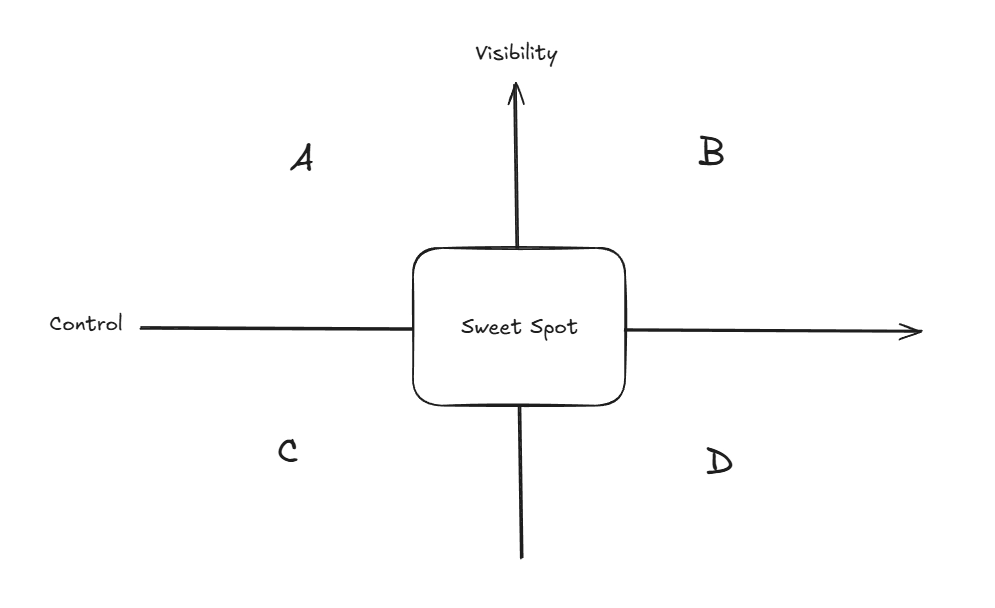
Reading the diagram
- A: High visibility, low control. The system is transparent, but the user has limited ability to influence outcomes.
- B: High visibility, high control. The system can be powerful and reassuring, but may become too complex or heavy for users seeking automation.
- C: Low visibility, low control. This is the weakest zone. The system feels like a black box and offers little reassurance.
- D: Low visibility, high control. The user is expected to intervene without enough context, which creates confusion rather than confidence.
The best product experience sits in a balanced zone where the user has enough context and enough intervention power without excess friction.
This leads to a first important implication: a generic validation interface should not maximize controls. It should optimize trust.
5. Wonka Operates Across a Spectrum of AI Workflows
A generic validation UI cannot be designed around a single workflow archetype.
Wonka operates across a spectrum of AI workflows that vary in structure, ambiguity, and autonomy. At one end are highly guided and constrained systems, where expected behavior is relatively explicit. At the other are more autonomous and open-ended agents, where interpretation, planning, and execution involve greater flexibility.
This has an important product implication: the validation layer must be standardized enough to remain reusable across deployments, while still supporting different levels of supervision depending on the workflow context.
The challenge is therefore not to build a different product for each workflow type, but to define a validation approach that remains coherent across the full operating spectrum.
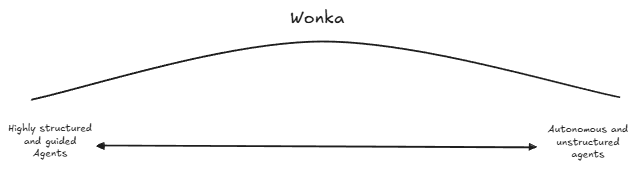
This spectrum is central to the business problem. A system that is too rigid will fail to support open-ended workflows. A system that is too loose will fail to reassure users in more constrained or business-critical contexts.
6. Emerging Functional Requirements
The business context above leads to the following functional requirements.
6.1 The system must provide sufficient visibility into workflow interpretation and execution
Users must be able to understand:
- what the agent interpreted
- what it intends to do
- what actions or tools are involved
- what result is being proposed or produced
Without this, the product creates a black-box effect.
6.2 The system must support validation before sensitive actions or outputs
The interface must allow users to review, confirm, or correct important actions and outputs when the business context requires it.
Some workflows can tolerate greater autonomy, while others require explicit human oversight.
6.3 The system must support different levels of supervision
Not every workflow requires the same validation depth. The product must support lightweight review in some cases and more explicit validation in others.
This follows directly from Wonka’s operating spectrum.
6.4 The system must remain generic across workflows
The validation layer must not depend on one specific use case or one fixed workflow shape.
Its value lies in cross-deployability and standardization.
6.5 The system must account for action permissions
The validation experience must reflect what the agent is allowed to do and under what conditions.
Trust depends not only on output quality, but also on operational boundaries.
6.6 The system must support meaningful user intervention
Users must be able to approve, reject, edit, or escalate when the system encounters ambiguity, risk, or business-critical decisions.
A validation UI is useful only if it allows meaningful intervention.
7. Emerging Non-Functional Requirements
In addition to the functional requirements above, the product should satisfy the following non-functional requirements.
7.1 Simplicity
The product must remain easy to understand and use, especially for SMB users seeking time savings rather than complex configuration.
7.2 Low friction
Validation must not become so heavy that it cancels out the value of automation.
7.3 Trustworthiness
The system must inspire confidence by making relevant information visible and surfacing uncertainty or risk clearly.
7.4 Modularity
The solution must support a broad range of workflows without requiring a custom-built interface for each one.
7.5 Extensibility
The platform must be able to accommodate additional workflow patterns, constraints, or validation needs over time.
7.6 Consistency
Users should encounter a coherent validation logic across workflows, even if the level of detail varies.
7.7 Safety
The system must reduce the risk of silent errors, invalid outputs, or unauthorized actions being executed without appropriate visibility or control.
7.8 Scalability
The validation approach must remain viable as the number of supported workflows and integrations increases.
8. Conclusion
The assignment can be interpreted as a dynamic UI generation problem, but that would miss the underlying business challenge.
A generic validation UI is the trust layer between AI autonomy and business operations.
To succeed, it must reduce the black-box effect, provide the right amount of control, remain reusable across heterogeneous workflows, and preserve the value of automation rather than weakening it.
This analysis leads to a clear conclusion: the product should be designed not only for genericity, but for trustworthy genericity.
The next step is therefore to translate these business insights into a technical design and prototype architecture capable of supporting this validation layer in practice.